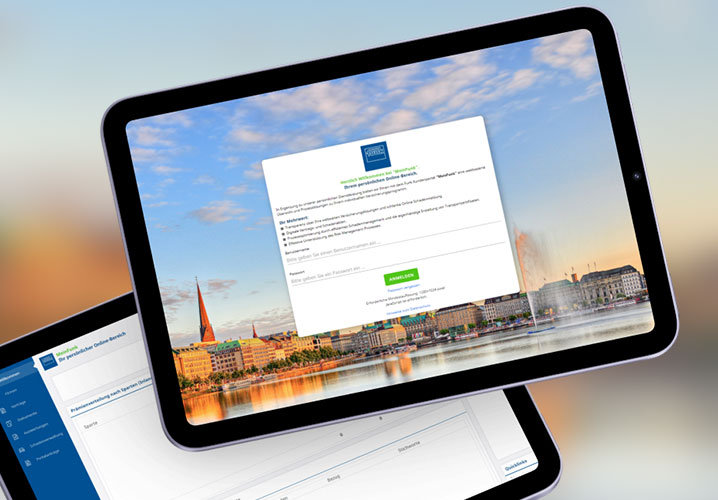

Funk Risk Assessment Portal: The efficient way to report risk data
Our in-house solution for querying and managing risk data: In your personal online area, you can view your due notifications for insurance policies, edit reports, upload documents, transfer data from previous reports, and submit them digitally. The reports are designed so that only relevant questions need to be answered.

Digitalization
User-friendly online solution instead of complicated paper forms.

Reduced Effort
Contracts with identical due dates are automatically consolidated.

Efficiency
Centralized management of all risk-related information, including report submission and document upload.

Data Protection
The solution is entirely operated by Funk—no third-party software access required.

Continuous Development
We continuously improve the platform based on your valuable feedback.

Timely Reminders
You will receive email notifications ahead of due dates.
Watch this short video to see how simple and efficient digital risk assessment can be!
How the Reporting Process Works:
1
Notification of New Requests
You will receive an automatic email with instructions on how to log in or register for the risk data collection. Log in with your existing MeinFunk account or use the registration link provided in the email (if you do not yet have an account).
2
Contact for Support
If you have any questions, our account managers and client service team are always available to help.
3
Submission of Risk Data
Please collect the required data and submit it by the specified deadline.
4
Feedback
Your feedback is important to us. Please share your suggestions with our client service or account management team.
FAQs:
How do you access your personal online area?
You will receive an email once your risk assessment is due.
From that point, you can access the portal via the following link: Online section for risk assessment
What does the implementation schedule look like?
The new solution will be available starting in summer 2025. Until then, we will gradually implement all features and keep you informed.
What does digitalization mean for you?
The digitalization simplifies the process of retrieving risk data by making it more efficient and user-friendly. You can conveniently manage your data online and access it at any time.
How do you benefit from the new online solution?
Save time by avoiding duplicate queries and automatically consolidating contracts with the same due dates. Plus, you only answer relevant questions—making the process much easier.
How does your personal online area work?
You can manage all risk-related data, edit reports, upload documents, and import data from previous reports.
What technical requirements are necessary?
All you need is internet access and an up-to-date web browser. No special software installations required.
Important: Please add the email address noreply@risikoerfassung.meinfunk.de to your whitelist to ensure important messages do not end up in your spam folder.
Troubleshooting & Error Messages
1. Incorrect email address or password
If the login details have not been entered correctly, the login will fail.
Notification:
"Unfortunately, your login was unsuccessful. Please check your email address and password."
Solution:
Please ensure that your email address and password have been entered correctly. Pay attention to upper and lower case letters.
2. No connection to login (backend not available)
The application cannot be connected to the backend. This may be due to the following reasons:
- The backend URL is not enabled in the client network.
- There is no active Internet connection.
- Security or firewall settings are blocking the connection.
Notification:
"Unfortunately, we were unable to connect to the login service (https://api.funk-gruppe.cloud/prod/dmv/quest). Please check your internet connection or your security settings (e.g., firewall) and try again."
Solution:
Check your Internet connection and ensure that the service's domain [https://api.funk-gruppe.cloud] is enabled on the network
3. Access blocked on your network
If the risk assessment is blocked in your network environment, the browser displays a generic default error message (e.g., “Page cannot be loaded”).
Notification:
“Page cannot be loaded”
Solution:
Please check your network settings or contact your internal IT department to enable access.
4. MeinFunk account is deactivated
If your MeinFunk account is disabled, you can’t sign into the risk assessment
Notification:
“Your account is currently deactivated. Please reactivate to continue.”
Solution:
The user account can be reactivated using the “Password forgotten/ Reactivate user account” button.
5. Unexpected errors
In individual cases, unspecified technical errors may occur.
Note:
In this case, your contact person at Funk will be happy to help you.
6. Problem opening the registration link from the email
All users receive a registration link in the welcome email, even if they may already be registered. When reopening, this may cause a meaningless error message to appear.
Solution:
If you are already registered to MeinFunk, please log in directly to the portal/page risikoerfassung.meinfunk.de for digital risk assessment—without using the link in the email.
Addition:
If you are not registered to MeinFunk yet, please use the link in the email.
7. Incorrect password when delegating reports/surveys
When setting up or using the message delegation feature, an incorrect password may be entered.
Notification:
“Unfortunately, your registration did not work. Please check your email address and password.”
Solution:
Re-enter your password or reset it.
Who is your contact person when questions or issues arise?
Your contact person at Funk is always available to answer questions and offer support if necessary.